Breadcrumbs
A headless breadcrumb primitive for React. Automatically collects breadcrumb items from nested layouts/components, then renders the full chain wherever you want — without breaking React’s one-way data flow. Built on top of foxact’s Magic Portal utility.
The Problem
Breadcrumbs are one of the trickiest UI patterns in React. Here’s why:
- Each route segment knows its own breadcrumb — the “Products” layout knows it contributes
{ title: "Products", href: "/products" }, the “Category” layout knows its own segment, etc. - But the breadcrumb UI lives in the root layout — typically inside a global layout header, far above any of those segments in the component tree.
- React data flows one way: top-down — children can’t push data up to a parent without breaking React’s fundamental model.
The naive solutions all have problems:
- Centralized breadcrumb config — you maintain a separate mapping of routes to breadcrumb items, duplicating what each layout already knows. It falls out of sync, and dynamic segments (e.g., product names fetched from an API) don’t fit the static config model.
- Global state (Redux, Zustand, etc.) — each layout dispatches its breadcrumb item on mount. This works, but triggers extra renders and requires careful cleanup. Overkill for what is fundamentally a tree-shaped problem.
- Lift everything up — pass breadcrumb data from the top through every layout. This couples all your layouts together and makes each one aware of the full chain, not just its own segment.
The Idea
With foxact/breadcrumbs, you declare breadcrumbs the same way you declare your UI — as components, right where they belong. Just like you write <h1>Products</h1> inside the Products layout, you write <BreadcrumbSegment title="Products" href="/products"> in the same place. Each breadcrumb segment is declared naturally alongside the UI it describes, and the full chain assembles itself automatically from the component tree. There’s no separate config file to maintain, no global store to dispatch into.
Under the hood, each BreadcrumbSegment uses React Context to accumulate the chain: it reads the parent chain, appends its own { title, href }, and provides the extended chain to its children. This is just nested context providers — the natural React tree hierarchy.
At the leaf (a page component), BreadcrumbCurrent reads the full accumulated chain and portals the rendered breadcrumb UI to a target element in the root layout via Magic Portal. No data flows “upward” — the chain is built top-down through context, and the UI is “teleported” back up to the global layout header via a React Portal.
The result:
- Declarative — breadcrumbs are declared as components in your UI tree, not configured elsewhere.
- Co-located — your breadcrumb declarations live right at your UI.
- Automatic collection — nesting
BreadcrumbSegmentcomponents is all it takes; no boilerplate wiring. - No extra renders — no global state, no
useEffectdispatches, no double-render workarounds.
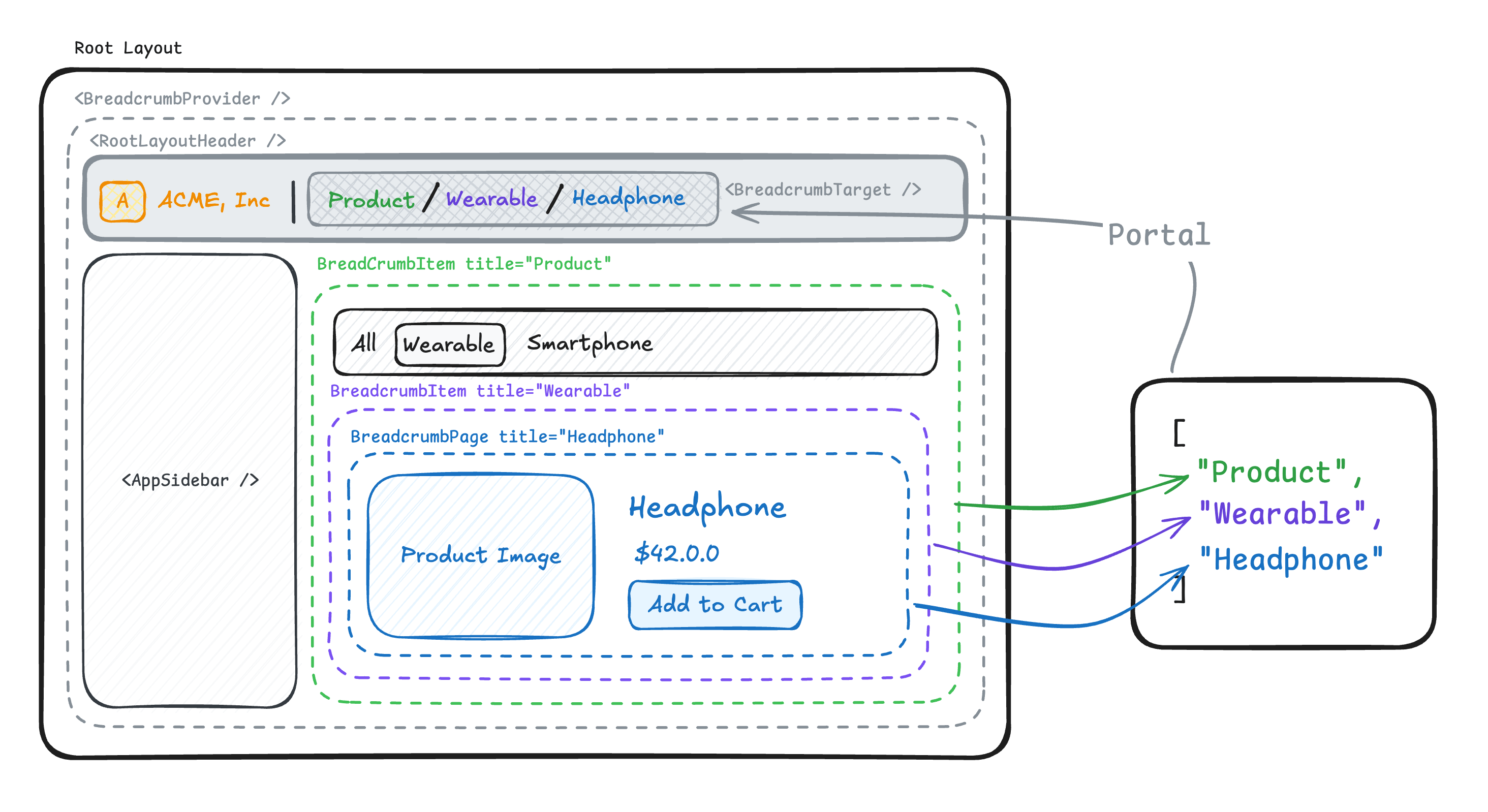
Want to use this “colocation - teleport” pattern to build UI? Check out our Magic Portal utility, which powers the Breadcrumbs under the hood.
Usage
Setup
Create the breadcrumb primitives in a shared file. createBreadcrumbs returns an array/tuple, so you can name the components and hooks however you like:
'use client';

import { createBreadcrumbs } from 'foxact/breadcrumbs';
// Also available from `foxact/create-breadcrumbs`:
// import { createBreadcrumbs } from 'foxact/create-breadcrumbs';

export const [
  // Provider — wrap your root layout
  BreadcrumbProvider,
  // Target — specify where the breadcrumb UI will "teleport" to, typically you render this in the root layout
  BreadcrumbTarget,
  // Segment — one per intermediate layout/route segment, declares a breadcrumb segment
  BreadcrumbSegment,
  // Current — the leaf that completes the chain and renders the breadcrumb UI
  BreadcrumbCurrent,
  // Hook — read the current breadcrumb chain from context
  useBreadcrumbs
] = createBreadcrumbs(
  // Optional name for easier debugging in React DevTools
  'MainNav'
);
Root Layout
Wrap your layout with BreadcrumbProvider and place BreadcrumbTarget where you want the breadcrumb to visually appear:
import { BreadcrumbProvider, BreadcrumbTarget } from '@/breadcrumbs';

export default function AppLayout({ children }: React.PropsWithChildren) {
  return (
    <BreadcrumbProvider>
      <header>
        {/* The breadcrumb UI will be portaled here */}
        <BreadcrumbTarget
          // Renders a <div> by default, but you can use any element
          as="nav"
          // Specify HTML attributes, with type-safe and auto-completion
          aria-label="Breadcrumb"
          className="breadcrumb-container"
        />
      </header>
      <main>
        {children}
      </main>
    </BreadcrumbProvider>
  );
}
Intermediate Layouts / Route Segments
In each intermediate layout / route segment, wrap children with BreadcrumbSegment to declare a breadcrumb segment:
import { BreadcrumbSegment } from '@/breadcrumbs';

export default function ProductsLayout({ children }: React.PropsWithChildren) {
  return (
    <BreadcrumbSegment title="Products" href="/products">
      {children}
    </BreadcrumbSegment>
  );
}
Under the hood,
BreadcrumbSegmentis a React context provider that accumulates the breadcrumb chain. That’s why you must provide subtree viachildren.
Leaf Page
In the leaf page, use BreadcrumbCurrent to complete the chain and render the breadcrumb UI. Pass a render function as children to receive the full item array:
import { BreadcrumbCurrent } from '@/breadcrumbs';

export default function ProductDetailPage({ product }: { product: Product }) {
  return (
    <div>
      <BreadcrumbCurrent title={product.name}>
        {(items) => (
          <ol>
            {items.map((item) => (
              <li key={item.href ?? item.title}>
                {item.href
                  ? <a href={item.href}>{item.title}</a>
                  : <span aria-current="page">{item.title}</span>}
              </li>
            ))}
          </ol>
        )}
      </BreadcrumbCurrent>

      <h1>{product.name}</h1>
      {/* ... */}
    </div>
  );
}
The items array for a product page nested under “Products” would look like:
[
  { title: "Products", href: "/products" },
  { title: "Super Widget" }  // last item — no href (current page)
]
You can also render a custom React element instead of providing a callback function. And you can read the item array via the useBreadcrumbs hook:
import { BreadcrumbCurrent } from '@/breadcrumbs';
import { ProductBreadcrumb } from './product-breadcrumb';

export default function ProductDetailPage({ product }: { product: Product }) {
  return (
    <div>
      <BreadcrumbCurrent title={product.name}>
        {/* Pass a React element instead of a function */}
        <ProductBreadcrumb />
      </BreadcrumbCurrent>

      <h1>{product.name}</h1>
    </div>
  );
}import { useBreadcrumbs } from '@/breadcrumbs';
export function ProductBreadcrumb() {
const items = useBreadcrumbs();
return (
<ol>
{items.map((item) => (
<li key={item.href ?? item.title}>
{item.href
? <a href={item.href}>{item.title}</a>
: <span aria-current="page">{item.title}</span>}
</li>
))}
</ol>
);
}This pattern is especially useful with React Server Components (RSC). Functions can’t be passed as props across the RSC boundary, but JSX elements can. So the shared parent can remain a Server Component while the child client component reads the chain via the hook.
Next.js App Router Example
createBreadcrumbs maps naturally to the Next.js App Router, where each route segment has its own layout.tsx:
// root layout
import { BreadcrumbProvider, BreadcrumbTarget } from '@/breadcrumbs';

export default function RootLayout({ children }: React.PropsWithChildren) {
  return (
    <BreadcrumbProvider>
      <header>
        <BreadcrumbTarget as="nav" aria-label="Breadcrumb" />
      </header>
      <main>{children}</main>
    </BreadcrumbProvider>
  );
}// layout for each route segment
import { BreadcrumbSegment } from '@/breadcrumbs';
export default function ProductsLayout({ children }: React.PropsWithChildren) {
return (
<BreadcrumbSegment title="Products" href="/products">
{children}
</BreadcrumbSegment>
);
}import { BreadcrumbSegment } from '@/breadcrumbs';
export default async function CategoryLayout({
children,
params
}: React.PropsWithChildren<{ params: Promise<{ category: string }> }>) {
const { category } = await params;
return (
<BreadcrumbSegment title={category} href={`/products/${category}`}>
{children}
</BreadcrumbSegment>
);
}import { BreadcrumbCurrent } from '@/breadcrumbs';
import { ProductBreadcrumb } from './product-breadcrumb';
export default async function ProductPage({ params }: { params: Promise<{ category: string, id: string }> }) {
const { id } = await params;
const product = await getProduct(id);
return (
<div>
<BreadcrumbCurrent title={product.name}>
<ProductBreadcrumb />
</BreadcrumbCurrent>
<h1>{product.name}</h1>
</div>
);
}'use client';
import { useBreadcrumbs } from '@/breadcrumbs';
import Link from 'next/link';
export function ProductBreadcrumb() {
const items = useBreadcrumbs();
return (
<ol>
{items.map((item) => (
<li key={item.href ?? item.title}>
{item.href
? <Link href={item.href}>{item.title}</Link>
: <span aria-current="page">{item.title}</span>}
</li>
))}
</ol>
);
}For a URL like /products/electronics/42, the breadcrumb chain would be:
[
  { title: "Products", href: "/products" },
  { title: "Electronics" /* params.category */, href: "/products/electronics" },
  { title: "Super Widget" /* params.id */ }
]
Custom Metadata
You can attach arbitrary metadata to each breadcrumb item by passing a generic type to createBreadcrumbs:
'use client';

import { createBreadcrumbs } from 'foxact/breadcrumbs';
import type { ReactNode } from 'react';

export const [
  BreadcrumbProvider,
  BreadcrumbTarget,
  BreadcrumbSegment,
  BreadcrumbCurrent,
  useBreadcrumbs
] = createBreadcrumbs<{ icon?: ReactNode }>('MainNav');
Then pass meta on each item and use it during rendering:
<BreadcrumbSegment title="Products" href="/products" meta={{ icon: <ShopIcon /> }}>
  {children}
</BreadcrumbSegment>

<BreadcrumbCurrent title={product.name} meta={{ icon: <ProductIcon /> }}>
  {(items) => (
    <ol>
      {items.map((item) => (
        <li key={item.href ?? item.title}>
          {item.meta?.icon}
          {item.href ? <a href={item.href}>{item.title}</a> : item.title}
        </li>
      ))}
    </ol>
  )}
</BreadcrumbCurrent>
Server-Side Rendering
createBreadcrumbs is built on top of createMagicPortal, which relies on React DOM’s createPortal. Since there is no target DOM node on the server, breadcrumb content is not emitted into the server-rendered HTML.
You can provide an SSR fallback (e.g., a skeleton) on the target:
<BreadcrumbTarget
  as="nav"
  aria-label="Breadcrumb"
  ssrFallback={<BreadcrumbSkeleton />}
/>
See the Magic Portal SSR docs for details on how ssrFallback works.